Artificial Intelligence
- Always check the output.
- Write prompts carefully. The more specific the prompt, the better the output.
- It's may be worth it to use a good model rather than wasting time on prompt engineering and receiving bad/wrong answers.
ChatGPT
Desktop app is only available for Apple Silicon chips (M-series).
You can download the Desktop app from GitHub though. It supports Intel chips as well.
A chrome extension can be installed to Chrome.
This extension will make ChatGPT your default search engine in Chrome. Once ChatGPT has been set as your default search engine, you can search directly via your browser URL bar.
→ Not worth it. ❌
How to boost response time in web browser ChatGPT:
-
Avoid long conversations. Start a new chat for each new topic.
Chatgpt needs to load the entire conversation history for generating answers, which slows down response time. You can also clear the history in settings.
-
Start a new chat at least everyday.
Q: How to delete chat history?
A: Click your account icon at the bottom left corner > Settings > Data Controls > Delete all chats. You will be asked to confirm the action. Confirm to delete all chat history.
VS Code
Enable ChatGPT to automatically find your mcp settings.
Change to true to enable discovery for the corresponding
"chat.mcp.discovery.enabled": {
  "claude-desktop": false,
  "windsurf": false,
  "cursor-global": false,
  "cursor-workspace": false
}
Claude
Models:
| Feature | Fable | Opus | Sonnet | Haiku |
|---|---|---|---|---|
| Description | Next-generation intelligence for long-running agents | For complex agentic research and enterprise work | Balance of speed and intelligence; general purpose | Fastest, simplest, and most cost-effective |
Mode
- Plan mode: is a read-only mode: Claude explores your codebase, works out a step-by-step plan, and presents it for approval before touching any files. Nothing gets written or executed until you approve. It’s meant for situations where you’re not sure what Claude will do — new codebases, big refactors, or anything destructive/hard to reverse
- Auto mode: Claude executes tools (edits, commands, etc.) without asking for permission on every single action, so you can kick off a task and walk away instead of approving each step.
Math display
Issue: Claude Code chat box does not render LaTeX equations properly.
Fix: Use Claude Code LaTeX.
| Before | After |
|---|---|
Plan and pricing
The prices below do NOT include VAT (Value Added Tax). If you are in Norway, you will be charged 25% VAT on top of the prices below.
| Plan | Free | Pro | Max 5x | Max 20x |
|---|---|---|---|---|
| Price | $0 | $20/month | $100 | $200 |
| Billing Interval | N/A | $200/year | Monthly | Monthly |
| Usage Capacity | daily limit, No Claude Code | 5-hour and weekly limit | 5x Pro capacity per session | 20x Pro capacity per session |
| Models | limited Sonnet | Sonnet + Opus | 5x higher usage limits than Pro, Opus access | 20x higher usage limits than Pro |
| Best For | Occasional use | Standard | Frequent users who work with Claude on a variety of tasks | Daily users who collaborate often with Claude for most tasks |
API measured in \$ per million tokens (MTok), or $/M.
Q: When does allowance renew?
A: The allowance renews every 30 days, starting from the day you subscribe to the Pro plan. For example, if you subscribe on January 15th, your allowance will renew on February 15th, March 15th, and so on.
Tips for saving money:
-
Use a virtual US card for lower tax than in Norway. E.g., grey.co
This virtual card will give you the possibility to use US tax rates (0 – 10%) instead of the Norwegian tax rate (25%).
Grey Visa card
The Visa virtual card is a virtual payment card linked directly to your Grey wallets (USD, EUR, GBP, and other supported currencies). It allows you to make online and card payments anywhere your Visa card is accepted without needing to fund or top up the card separately.
-
Top up your linked wallet before making payments.
Do NOT need to top up the Grey Visa card itself.
-
The Visa card itself does NOT support deposits or top-ups. All payments are deducted directly from your selected Grey wallet.
-
If your card is linked to a non-USD wallet (e.g., EUR or GBP), Grey converts the equivalent amount to USD at the point of payment so the transaction can be settled. This conversion is not free.
Flow of money:
Regular bank card → Revolut → Grey wallet → Claude
Q: How to top up Revolut?
A: In the home page of Revolut app, tap Add money and follow the instructions there.
Q: How to top up Grey wallet from Revolut?
A: In the Revolut app, tap Payments, you will see your Grey wallet as a contact. Tap it and follow the instructions to top up your Grey wallet.
Benefits of using Revolut:
-
Fast
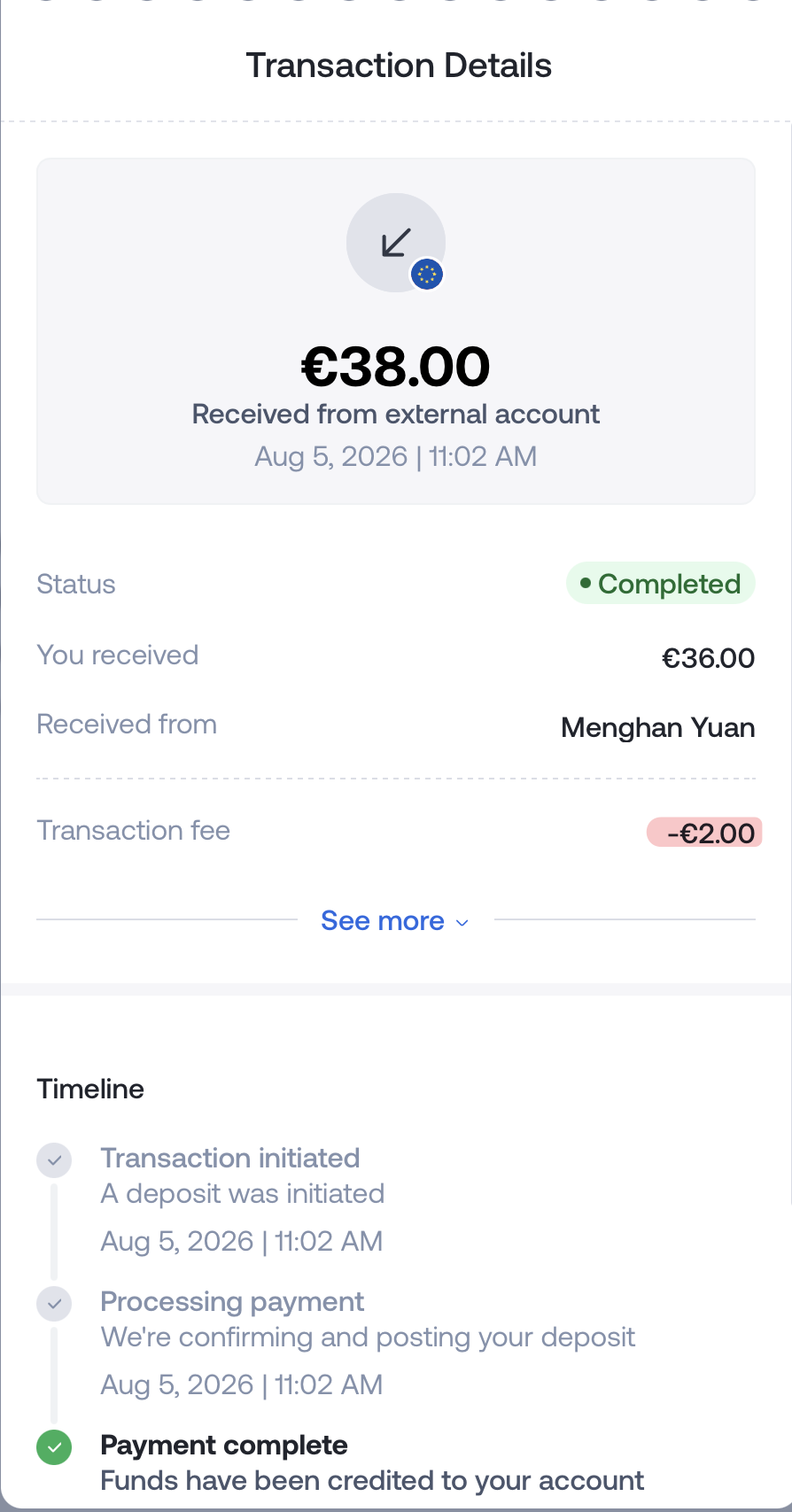
Takes 1-2 hours for the money to arrive in your Grey wallet if you use Grey for the first time. It would be instant for subsequent top-ups.
In contrast, it can take 1-3 business days for the money to arrive if you top up via bank transfer.
-
No fees from the Revolut side.
- Grey charges a 0.8% fee, min €2, max €10 per transaction.
- Revolut charges a 1% fee for FX conversion on weekends due to less currency liquidity.
Speech to Text
Whisper from OpenAI is a powerful tool for converting audio files to text. It supports multiple languages and can handle various audio formats. Whisper recognizes 98 different languages, including Norwegian and English. You can either transcribe text in the same language or translate it into English.
Speech to text can be used to transcribe most types of audio and video files. The service can also be used to streamline the subtitling of video.
The quality of the automatic transcription with Whisper will vary, and the text should be reviewed and corrected manually. Both the sound quality of the recording itself and the language or dialect to be transcribed will affect the accuracy of the transcript.
Refer to Transcribe Norwegian Audio for a tutorial.
Image to Text
OCR (Optical Character Recognition)
Just run it using your API credentials. Here is a simple example. Just put in your real API Key, actual image url, and what you want in System and User. Just like the chat models, lots of influence with System and User.
source: https://community.openai.com/t/image-to-text-description-in-the-api/477152/7
Useful Prompts
Rephrase / reformulate them in a story-like format (e.g., “ABC Corp. has just closed its books…”), so they feel more realistic?
I am writing the problem-solving sketch / gist for a quiz question for my students. Improve the language of the sketch / gist, make logic flow naturally.
Format bullet lists
One space after (a), (b), etc.
No trailing spaces at the end of lines.
Return Markdown
Return the answer in markdown format directly in the chat box.
Use dollar signs for math.
Useful template
-
create an exercise
Task: Create a prototype quiz exercise based on the exercise I provdie belowe. Requirement: Students can solve with pen and paper.
Instruction: Simulate 2 assets scenario, correlation 0.9, the asset return should be easy to calculate, i.e., no long digits after decimal.
Output: Should be a narrative exercise to one-file.qmd
Quiz question:
-
change style suitable for teaching
I want to add that exercise into one-file.qmd.
I am using xaringan presentation to make slides for teaching purposes. You need to break down the exercise into multiple pages suitable for presentation.
-
Provide solutions
Provide the solution sketch to section xx.
Be concise, should include formulas and plugging in the corresponding numbers.
Useful tools
-
Codex GUI: https://openai.com/codex/
-
Codex CLI: https://developers.openai.com/codex/cli
-
Claude Code: https://code.claude.com/docs/en/overview
Skills
- Paper reviewer with various agents: https://github.com/Ingar30/reviewer
- A collection of Skills: https://smithery.ai/skills
Gemini
In VS Code, Type / to see commands such as /tools and /mcp.
Model selection
-
In
~/.gemini/settings.json{ "model": { "name": "gemini-2.5-pro" }, "experimental": { "useModelRouter": false } } -
Use parameter when launching Gemini CLI
gemini --model gemini-2.5-pro
/model: switch models
/stats: view usage stats
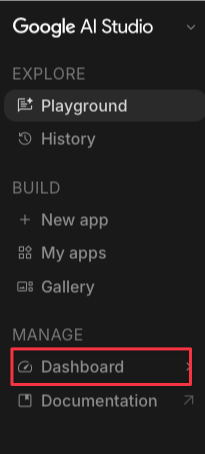
Left panel > Deashboard, you can get your API ket, view Rate Limit, Usage, etc.
You can configure MCP servers in your settings.json file in two main ways:
-
through the top-level
mcpServersobject for specific server definitions, and{ ...file contains other config objects "mcpServers": { "serverName": { "command": "path/to/server", "args": ["--arg1", "value1"], "env": { "API_KEY": "$MY_API_TOKEN" }, "cwd": "./server-directory", "timeout": 30000, "trust": false } } }Based on configuration properties, choose one of the following transport methods:
command: Path to the executable for Stdio transporturl: SSE endpoint URL (for example, “http://localhost:8080/sse”)httpUrl: HTTP streaming endpoint URL
Issue: [Gemini Code Assist VSCode Extension] MCP Servers are not working, stuck in “Connecting” state ↩
The same MCP Server configuration can be used successfully in Gemini cli.
-
through the
mcpobject for global settings that control server discovery and execution. → Optional{ "mcp": { "allowed": ["my-trusted-server"], "excluded": ["experimental-server"] } }mcp.allowed(array of strings): A list of MCP server names to allow. If this is set, only servers from this list (matching the keys in themcpServersobject) will be connected to.mcp.excluded(array of strings): A list of MCP server names to exclude. Servers in this list will not be connected to.
MCP
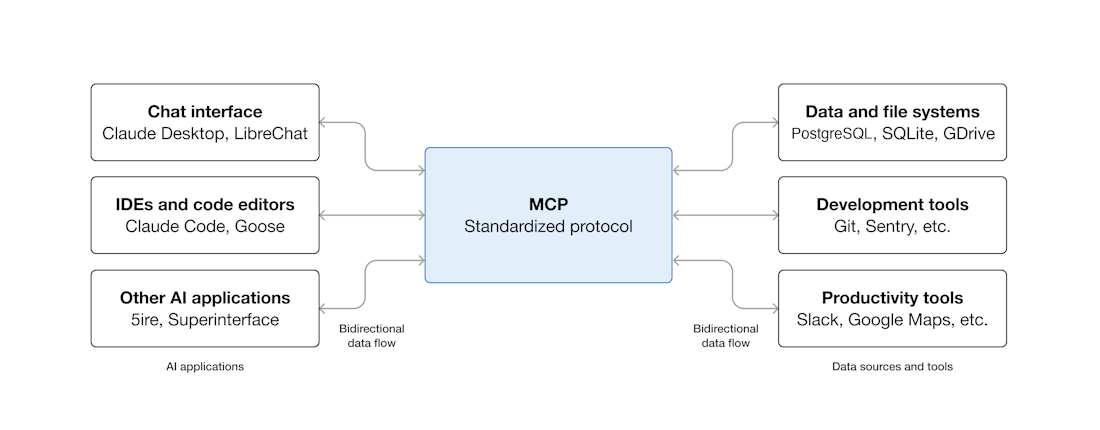
MCP (Model Context Protocol) is an open-source standard for connecting AI applications to external systems.
Using MCP, AI applications like Claude or ChatGPT can connect to data sources (e.g. local files, databases), tools (e.g. search engines, calculators) and workflows (e.g. specialized prompts)—enabling them to access key information and perform tasks.
Think of MCP like a USB-C port for AI applications. Just as USB-C provides a standardized way to connect electronic devices, MCP provides a standardized way to connect AI applications to external systems.
Further readings: