10.7 Histogram
geom_histogram(mapping = NULL,
   data = NULL,
   stat = “bin”,
   position = “stack”,
   …,
   binwidth = NULL,
   origin = NULL,
   breaks = NULL,
   bins = NULL,
   na.rm = FALSE,
   orientation = NA,
   show.legend = NA,
   inherit.aes = TRUE
)
binwidthThe width of the bins.Can be specified as a numeric value or as a function that calculates width from unscaled x. Here, “unscaled x” refers to the original x values in the data, before application of any scale transformation. When specifying a function along with a grouping structure, the function will be called once per group.
The default is to use the number of bins in
bins, covering the range of the data.stat_bin()usingbins=30; this is NOT a good default, but the idea is to get you experimenting with different number of bins.You can also experiment modifying the
binwidthwithcenterorboundaryarguments.binwidthoverridesbinsso you should do one change at a time.You should always override this value, exploring multiple widths to find the best to illustrate the stories in your data.
binsNumber of bins. Defaults to 30. Overridden by binwidth.My experience is that it’s easier to specify
binsat first to get a rough idea of the range of the axis. Then specifybinwidthto get more control over the binning.If you have both
binsandboundaryspecified,boundarymight be ignored.Use
binwidthandboundarytogether to ensure that the bins are aligned with the specified boundary.center,boundarynumeric values specify bin positions. One value for eithercenterorboundaryis adequate, other values will be automatically filled usingbinwidth.centerspecifies the center of one of the bins. Default figure will use center position to identify bins.boundaryspecifies the boundary between two bins. Boundary values are more informative.✅ [recommended to specify one boundary value; just easier to say boundaries]
Worth noting that
centerandboundarycan be either above or below the range of the data, in this case the value provided will be shifted of a multiple number ofbinwidth.
breaksActual breaks to use. Intervals are created as left open, right closed. But specifying insidegeom_histogrammight show weird breaks in y-axis labels.✅ Specifying breaks using
scale_x_continuousis a better practice.
p <- ggplot(data = data, aes(tmp) ) +
    geom_histogram(
      fill = "#BDBCBC", color = "black",
      binwidth = 2, boundary = 0) +
    labs(x = "Average temperature [ºC]")
p
geom_histogram(aes(..density..)) surrounding the variable names with .. means to call after_stat function. It delays the mapping until later in the rendering process when summary statistics have been calculated. The expression ..density.. is deprecated; use after_stat() in stead.
Most aesthetics are mapped directly from variables found in the data, called direct input (stage1). Sometimes, however, you want to delay the mapping until later stages of the data that you can map aesthetics from, and three functions to control at which stage aesthetics should be evaluated.
after_stat(x) and after_scale(x) can be used inside the aes() function, used as the mapping argument in layers.
after_stat(x)uses variables calculated after the transformation by the layer stat (stage 2);E.g., the height of bars in
geom_histogram()can be density probability;# this shows the count frequency ggplot(faithful, aes(x = waiting)) + geom_histogram(fill = "#BDBCBC", color = "black") # this shows the density plot, can replace after_stat(density) with ..density.. # surrounding the variable name with two dots ggplot(faithful, aes(x = waiting)) + geom_histogram(aes(y = after_stat(density)), fill = "#BDBCBC", color = "black") + geom_density() # empirical densityafter_stat(count)show frequency count;after_stat(ncount)count, scaled to a maximum of 1;after_stat(density)show density;after_stat(ndensity)density, scaled to a maximum of 1;
after_scaleuses variables calculated after the scale transformation (stage 3); see documents here.- could be used to label a bar plot;
10.7.1 Set axis limits for histogram
❗ Always use coord_cartesian() to set axis limits for histogram as scale_x_continuous(limits = c(0, 1)) will remove data outside the limits, which can lead to incorrect calculations and visualizations.
coord_cartesian(xlim = c(0, 1)) will zoom in on the part of the graph when x is between 0 and 1, without removing data outside the limits. The axis will expand automatically to fit the data, by default, it will add a padding of 5% on each side of the data range. That means if the data range is from 0 to 1, the x-axis will be expanded to range from -0.05 to 1.05.
You can adjust this padding using the expand argument in scale_x_continuous(expand = c(0, 0)), which will remove the padding and set the axis limits exactly to the specified range of 0 to 1.
Use ?scale_x_continuous to learn more about the expand argument. More nuanced control over the expansion can be achieved by using expansion functions, e.g., scale_x_continuous(expand = expansion(mult = c(0.1, 0.2))) will add a 10% expansion on the lower end and a 20% expansion on the upper end of the x-axis.
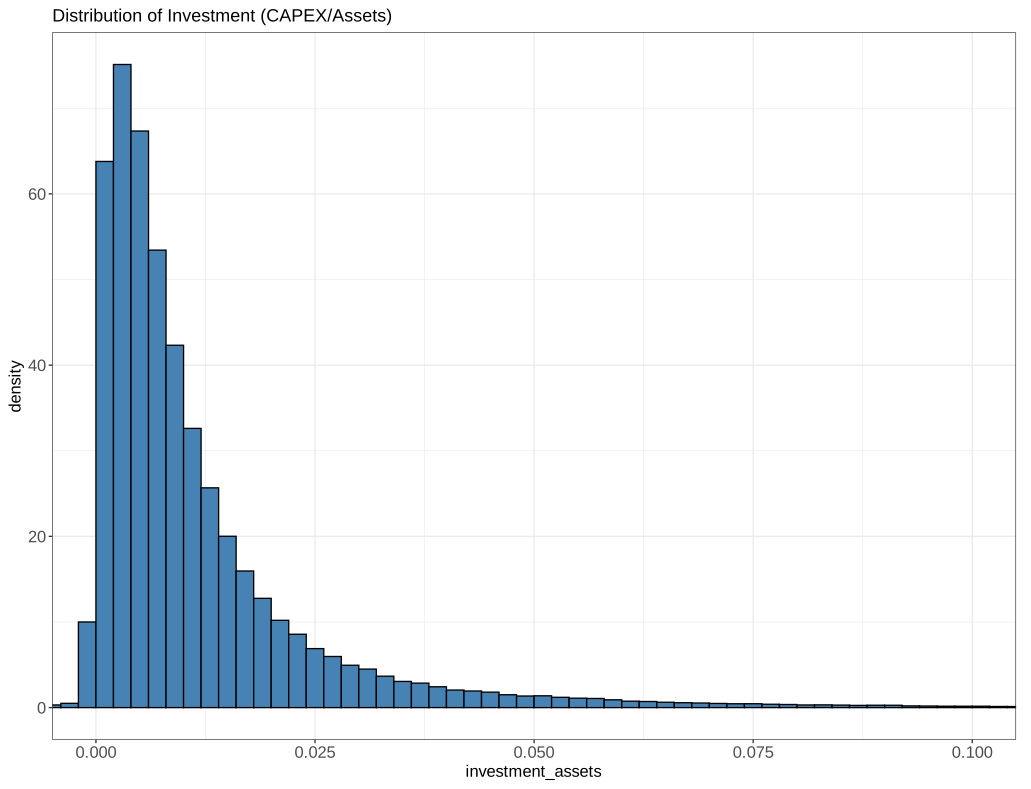
fundamental_complete %>%
    ggplot(aes(x = investment_assets)) +
    geom_histogram(binwidth = .002, aes(y = ..density..), fill = "steelblue", color = "black", boundary = 0) +
    coord_cartesian(xlim = c(0, 0.1)) +
    scale_x_continuous(expand = c(0.05, 0)) +
    labs(title = "Distribution of Investment (CAPEX/Assets)")
This will set the main x-axis range to 0 to 0.1, and add padding of \(5\% \times 0.1\) to both sides of the x-axis, resulting in an expanded range of -0.005 to 0.105.
10.7.2 Add fitted density from a distribution
# fit a lognormal distribution
library(MASS)
fit_params <- fitdistr(prices_monthly$AdjustedPrice,"lognormal")
fit_params$estimate

ggplot(prices_monthly, aes(x = AdjustedPrice)) +
    geom_histogram(bins = 40,
                   aes(y = ..density..),
                   fill="#BDBCBC", color="black") +
    stat_function(fun = dlnorm,
                  args = list(meanlog = fit_params$estimate['meanlog'],
                            sdlog = fit_params$estimate['sdlog']),
                  colour = "red"
                  ) +
    scale_x_continuous(limits = c(0, 170))
10.7.3 Histogram of a vector
This returns an error: data must be a data.frame. If you don’t provide argument name explicitly, sequential rule is used – data arg is used for aes(x=dice_results).
To correct it – use arg name explicitly:
Alternatively, you may use it inside geom_ functions family without explicit naming mapping argument since mapping is the first argument unlike in ggplot function case where data is the first function argument.
ggplot() + geom_bar(aes(dice_results))

# or use the `aes` function
ggplot() +
        aes(dice_results) +
        geom_bar()
Vertical histogram
https://stackoverflow.com/a/13334294/10108921
geom_bar and geom_col plots bar charts.
geom_barmakes the height of the bar proportional to the number of cases in each group.geom_colthe heights of the bars to represent values in the data
10.7.4 Add a band
geom_ribbon(
data = sim_obs_quantile,
aes(ymin= plot confidence interval (CI) in shaded areas.17%, ymax=83%),
alpha=0.2, fill=“#F8766D”
)
10.7.5 Add a line or arrow
geom_segment(
   aes(x = x1, y = y1, xend = x2, yend = y2),
   col = “red”,
   arrow = arrow(length = unit(0.3, “cm”) )
)
draws a straight arrowhead line from the start point (x, y) to the end point(xend, yend) in the plot.
arrowspecification for arrow heads, as created bygrid::arrow().lengthset the length of the arrow head to 0.3 cm.
10.7.6 Add shapes
annotate(
   geom = “segment”, x = 12, y = -0.05, xend = 12, yend = 0,
   col = “red”, arrow = arrow(length = unit(0.3, “cm”) )
)
draws arrows outside the plot.
geomspecifies the type of annotation to draw. It can be anygeom_functions, e.g.,"text","label": for adding text annotations to the plot."segment","curve"for adding line segments or curves to the plot."rect"for adding rectangles to the plot.